Home Humanoid Robot Safety Checklist
Table of Contents
- A humanoid robot is machinery inside your home
- Start with the humanoid robot safety case
- Add emergency-stop testing to your humanoid robot checklist
- Payload claims need context
- Stairs should be considered a restricted zone
- Children, pets, and visitors change the risk model
- Audit home robot privacy and remote access
- Check home robot security and offline operation
- Updates can improve safety or introduce new failures
- Repairability, insurance, and end-of-life questions
- Verify home robot privacy through complete data deletion
- Final humanoid robot checklist for buyers and developers
- A humanoid robot is machinery inside your home
- Start with the humanoid robot safety case
- Add emergency-stop testing to your humanoid robot checklist
- Payload claims need context
- Stairs should be considered a restricted zone
- Children, pets, and visitors change the risk model
- Audit home robot privacy and remote access
- Check home robot security and offline operation
- Updates can improve safety or introduce new failures
- Repairability, insurance, and end-of-life questions
- Verify home robot privacy through complete data deletion
- Final humanoid robot checklist for buyers and developers
A humanoid robot is machinery inside your home
A home humanoid may look approachable, speak politely, and use AI to interpret loose instructions. Underneath is a mobile machine whose motors, batteries, cameras, microphones, network connections, and mass make humanoid robot safety essential.
A conversational demo does not prove that a robot can safely carry dishes past a child, recover from a network outage, or stop before stepping on a sleeping pet. This AI robot buyer guide focuses on verifying physical safety, privacy, security, offline operation, support, and data deletion before buying.
Before buying or developing a home humanoid, establish its status:
- Commercially available: customers can order the finished product under published terms.
- Limited deployment: selected partners or pilot households receive supervised units.
- Announced: reservations, demonstrations, or projected delivery dates exist, but ordinary buyers cannot obtain the product yet.
- Research-only: the system is primarily a laboratory platform or controlled demonstration.
A polished video can belong to any of these categories. Ask for evidence from unscripted operation in occupied homes.
Source page reviewed in Chrome during article research. Follow the image link for the current page.
Start with the humanoid robot safety case
The first question is not whether the robot can fold a shirt. Ask what happens when perception, balance, software, or human judgment fails.
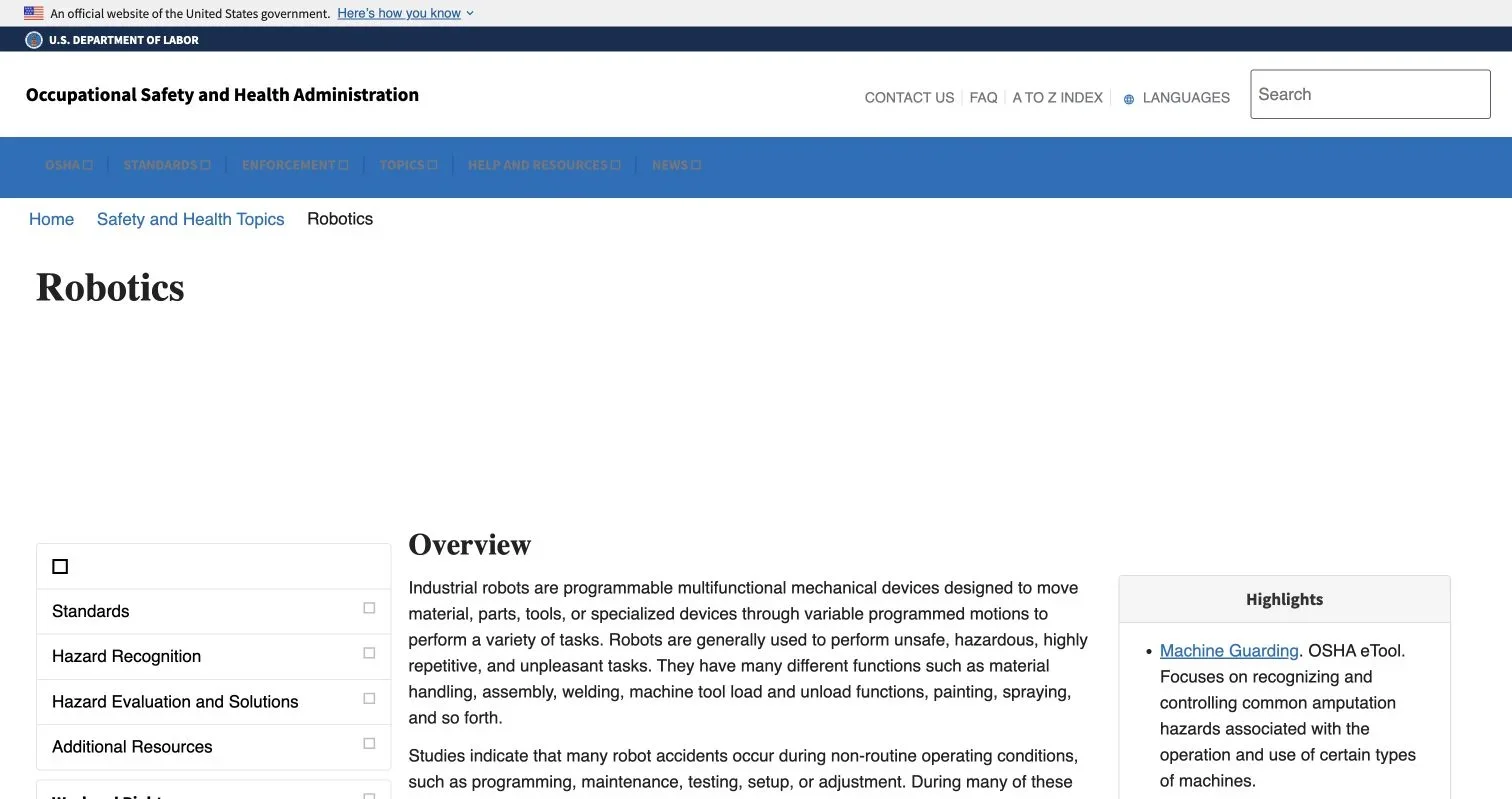
OSHA’s robotics guidance concerns workplaces rather than private homes, but one lesson transfers cleanly: many robot accidents occur during non-routine conditions such as programming, maintenance, testing, setup, and adjustment. Those are when a developer, owner, or technician may enter the robot’s reach.
The OSHA Robotics overview warns that non-routine work can place people inside a robot’s working envelope. Source: Occupational Safety and Health Administration.
| Item | What to Check | Why It Matters |
|---|---|---|
| Mass and speed | Total mass, maximum walking speed, arm speed, and user-adjustable limits | A slow collision can still injure a child or knock over an older adult |
| Force limiting | Published limits for joints, grippers, impacts, and pinching; test method used | Saying a robot is “gentle” is not a measurable safety claim |
| Stability | Recovery behavior after a push, trip, low battery, actuator fault, or dropped load | A falling humanoid can become a heavy uncontrolled object |
| Sharp and hot surfaces | Exposed linkages, pinch points, vents, charging contacts, and surface temperatures | Everyday contact creates hazards absent from a staged demonstration |
| Battery safety | Cell certification, charging supervision, fault alerts, storage instructions, and fire response | A large lithium battery introduces thermal and electrical risks |
| Operating boundaries | Indoor/outdoor rating, floor types, moisture limits, temperature range, and prohibited areas | Perception and traction may degrade outside tested conditions |
| Fault response | Behavior after a sensor, motor, processor, or communications failure | Safe failure should mean stopping predictably, not improvising |
For personal-care robots, ask whether the manufacturer designed and assessed the product against ISO 13482 or another applicable standard. ISO 13482:2014 addresses personal-care robot hazards and physical human-robot contact. As of July 2026, ISO lists the second edition, ISO/FDIS 13482, as a final draft under development. A vendor should state the edition and scope rather than claim “ISO compliance.”
Add emergency-stop testing to your humanoid robot checklist
An app-only emergency stop fails when the robot loses Wi-Fi, the phone is locked, or somebody else holds it.
| Item | What to Check | Why It Matters |
|---|---|---|
| Physical stop control | A conspicuous, reachable control on the robot or supplied remote | People need a direct way to halt motion |
| Stop without cloud access | Operation with internet, Wi-Fi, and companion app unavailable | Emergency protection cannot depend on a remote server |
| Controlled stop behavior | Whether the robot freezes, lowers a load, sits, braces, or powers joints down | Instantly removing torque can make a standing robot fall |
| Restart procedure | Deliberate manual reset and confirmation that the area is clear | Motion must not resume merely because connectivity returns |
| Multiple users | Whether household members can stop the robot without the owner’s phone | Visitors, caregivers, and family members may face the hazard |
| Event record | Local or exportable logs showing why a stop occurred | Logs help diagnose faults without relying on guesswork |
Run this acceptance test before allowing autonomous operation:
- Clear the room and keep another adult near the main power disconnect.
- Command a slow, low-risk movement with no payload.
- Trigger every documented stop method.
- Repeat after disconnecting the internet and then the local network.
- Confirm that motion does not restart automatically.
- Repeat with a light, unbreakable payload to observe whether it is dropped or lowered.
Do not perform improvised collision tests with a person, child, or animal. Ask the developer for documented validation results instead.
Payload claims need context
A maximum payload rarely tells the whole story. Carrying 10 kilograms close to the torso on a flat laboratory floor is different from reaching into a cupboard with the same load.
| Question | Acceptable Evidence | Red Flag |
|---|---|---|
| Where may the load be held? | A load chart covering reach, height, and posture | One maximum number with no geometry |
| What objects are prohibited? | Limits for hot liquids, knives, glass, chemicals, and living beings | “General household objects” with no exclusions |
| How does grasp failure work? | Detection thresholds and a controlled release policy | The gripper simply loses power |
| Can users change force limits? | Protected roles, safe ranges, and recorded changes | An unrestricted developer slider |
| How was carrying tested? | Repeated trials on declared surfaces and failure cases | A single promotional video |
Treat food preparation, medication handling, bathing assistance, and carrying a person as separate high-risk applications. Competence at moving boxes does not establish competence in any of them.
Stairs should be considered a restricted zone
Stairs combine balance and falling-object risks with incomplete visibility. Without explicit stair specifications and independent test evidence, assume the robot is not stair-capable.
- Install physical gates or barriers that the robot cannot operate.
- Define digital exclusion zones, but do not rely on software boundaries alone.
- Check balconies, split-level floors, sunken rooms, and open basement doors.
- Ask what happens when mapping is stale or localization confidence drops.
- Keep charging docks away from landings and escape routes.
A developer should test edge detection using realistic lighting, reflective floors, carried objects that obscure sensors, and network loss. A controlled climb does not show what happens during descent with a damaged depth camera.
Children, pets, and visitors change the risk model
Children may hug, climb, imitate, command, or obstruct a robot. Pets can sleep in its path or react unpredictably to motors. Visitors may not know that the machine is active.
| Item | What to Check | Why It Matters |
|---|---|---|
| Child detection | Tested detection ranges for crawling, seated, and partially hidden children | Adult-height perception tests are insufficient |
| Pet detection | Published limits by animal size, lighting, and posture | Small or dark-coated pets may be missed |
| Voice permissions | User recognition, confirmation for risky commands, and guest restrictions | A television or child should not trigger hazardous actions |
| Climb and pull resistance | Stability limits and instructions for foreseeable misuse | People will touch a humanoid differently from an appliance |
| Quiet mode | Reduced speed and restricted tasks during sleep or low visibility | Night operation creates low-observation hazards |
| Visible state | Clear signals for listening, recording, autonomous motion, fault, and remote control | People need to understand what the robot is doing |
Do not allow unsupervised operation around young children, at-risk adults, or animals until the manufacturer supports that use and the home has been assessed.
Audit home robot privacy and remote access
Home robot privacy is harder than smart-speaker privacy because a mobile robot can move through rooms, change its viewing angle, manipulate objects, and build spatial maps.
Ask the vendor to identify every sensor and data destination:
- RGB, infrared, depth, thermal, and navigation cameras
- Microphone arrays and wake-word buffers
- Room maps, object labels, faces, voices, and behavioral profiles
- Telemetry, diagnostics, crash recordings, and training samples
- Human teleoperation or remote-assistance video streams
| Privacy control | What to Require | Weak Answer |
|---|---|---|
| Recording indicator | Hardware-linked light or signal that cannot be disabled by ordinary software | An icon visible only in the app |
| Sensor disablement | Physical shutters, microphone disconnects, or documented hardware controls | “You can mute notifications” |
| Remote operator disclosure | On-robot notice plus records of when and why access occurred | Remote assistance hidden in general terms |
| Data minimization | Collection limited by task, room, user, and retention period | Indefinite collection “to improve AI” |
| Access security | Unique credentials, multifactor authentication, encryption, and role-based access | Shared household password or vendor-wide access |
| Training consent | Separate, revocable opt-in for model training | Training bundled into basic operation |
The FTC’s Ring case is a useful warning about cameras inside homes: employee access, contractor access, account security, and derived data all matter. A robot vendor’s privacy policy should address these issues.
Check home robot security and offline operation
“AI-powered” can describe different architectures. Navigation may run locally with classical SLAM while language understanding, visual-language-action planning, teleoperation, or logging depends on cloud services.
| Function | Prefer Local Operation? | Buyer Question |
|---|---|---|
| Emergency stop and collision avoidance | Yes, always | Does safety remain active during total network loss? |
| Walking and balance control | Yes | Can loss of cloud communication destabilize motion? |
| Basic navigation | Usually | Can the robot return safely if external localization fails? |
| Speech transcription | Privacy-dependent | Is audio processed locally, remotely, or both? |
| Task planning | Product-dependent | What commands still work offline? |
| Diagnostics | Mixed | Can logs be exported without granting live vendor access? |
Request a written degraded-mode matrix for:
- Internet outage
- Local Wi-Fi outage
- Vendor cloud outage
- Subscription expiration
- Account suspension
- Manufacturer shutdown
If a startup’s closure leaves the robot motionless and unrepairable, that hidden risk is part of the purchase price.
Updates can improve safety or introduce new failures
Connected robots need security updates, but each can change motion, perception, privacy settings, or learned behavior. NIST IR 8425 provides a useful consumer IoT baseline covering data protection, interface access control, software updates, cybersecurity-state awareness, and manufacturer documentation.
| Item | What to Check | Why It Matters |
|---|---|---|
| Support period | A specific minimum date for security and safety updates | “Lifetime support” is meaningless without a defined lifetime |
| Update authenticity | Signed updates delivered through protected mechanisms | Compromised software can control physical motion |
| Release notes | Changes to safety limits, sensors, cloud processing, and data use | Owners need to know when the risk model changes |
| Rollback | A safe recovery path after a failed update | A bad update should not permanently disable the robot |
| Settings preservation | Exclusion zones and privacy choices survive updates | Defaults may silently reopen cameras or restricted rooms |
| Vulnerability reporting | Published security contact and response process | Researchers need a responsible disclosure route |
Developers should separate experimental learning from safety-rated control. A VLA model or reinforcement-learning policy may propose actions, but independent limits must constrain speed, force, workspace, and prohibited tasks.
Repairability, insurance, and end-of-life questions
Humanoids contain wear parts. Joints develop play, sensors lose calibration, batteries age, and protective covers get damaged. A new unit’s safety claims may not hold after two years of household use.
Before purchase, get written answers about:
- Replacement batteries, actuators, grippers, covers, and sensors
- Calibration intervals and required service tools
- Diagnostic access for independent repairers
- Shipping procedures for a heavy damaged unit
- Availability of parts after warranty expiration
- Transfer of ownership and account credentials
Ask the insurer whether homeowners’ or renters’ coverage includes autonomous-robot damage, home business use, cyber incidents, or injuries from unauthorized modifications.
| Insurance Question | Why Ask |
|---|---|
| Is personal liability coverage applicable? | A robot may injure a visitor or damage neighboring property |
| Is the robot covered as personal property? | Policy limits and exclusions may apply to expensive electronics |
| Does commercial use change coverage? | A home office, rental, or paid caregiving task may trigger exclusions |
| Are software and cyber incidents covered? | Physical damage may begin with account compromise or faulty updates |
| Must the insurer be notified? | Undisclosed high-value or unusual equipment can complicate a claim |
Verify home robot privacy through complete data deletion
Deletion must extend beyond the app account. It should cover the robot, removable storage, cloud services, backups, support systems, remote-operation recordings, annotations, and derived profiles.
- Export the available data and review what the vendor has stored.
- Factory-reset the robot using the documented procedure.
- Delete household maps, faces, voices, routines, and credentials.
- Submit the vendor’s cloud-deletion request.
- Ask whether training data or derived models are excluded from deletion.
- Obtain confirmation and the expected backup-expiration period.
- Repeat the process before resale, return, repair, or disposal.
The final version of NIST IR 8259 Revision 1 advises manufacturers to provide customers with security functionality and the information needed to manage cybersecurity risk. For home robots, that documentation should include deletion instructions and end-of-support behavior.
Final humanoid robot checklist for buyers and developers
| Item | What to Check | Why It Matters |
|---|---|---|
| Market status | Commercial product, limited pilot, announcement, or research platform | Demo readiness is not household readiness |
| Intended use | Exact supported tasks and prohibited tasks | Safety evidence applies only within a defined use |
| Physical risk | Mass, speed, force, stability, pinch points, and battery controls | These determine injury and property risks |
| Emergency stop | Physical, local, tested, and restart-protected | The robot must be stoppable without an app or cloud |
| Payload | Load chart, object restrictions, and grasp-failure behavior | Maximum payload alone can mislead |
| Stairs | Explicit capability, test evidence, and physical barriers | A fall can injure people below |
| Children and pets | Detection limits and supervision requirements | Small, unpredictable occupants are difficult perception targets |
| Privacy | Sensor inventory, indicators, remote-access logs, and training consent | The robot can observe intimate spaces |
| Offline behavior | Written degraded-mode matrix | Cloud failure must not create unsafe motion |
| Updates | Support date, signatures, release notes, and recovery | Software changes can alter physical behavior |
| Repair | Parts, calibration, tools, warranty, and service access | Wear can invalidate original safety assumptions |
| Insurance | Written confirmation from the insurer | Coverage should be checked before an incident |
| Data deletion | Device, cloud, backups, recordings, and derived data | Factory reset may leave substantial data behind |
Home humanoids combine machinery, connected-camera, cloud-software, and experimental-AI risks in one moving product. They remain buyable only when documented limits, failure tests, service commitments, and effective controls demonstrate humanoid robot safety, home robot security, and privacy. If a manufacturer responds with another cinematic demo, keep your wallet closed.
Frequently Asked Questions
What safety evidence should I request before buying a home humanoid robot?
Ask for documented limits on speed, force, payload, stability, battery operation, and supported environments. Look for results from realistic failure testing and unscripted use in occupied homes, not just demonstrations or broad claims of standards compliance.
Can a home humanoid robot operate safely without internet or Wi-Fi?
Emergency stopping, balance, collision avoidance, and other necessary protections should work locally during a complete network outage. Request a written degraded-mode matrix explaining what happens during internet, Wi-Fi, cloud, subscription, and account failures.
Is an emergency-stop button in a phone app sufficient?
No. The robot should have a conspicuous physical stop control that household members can use without a phone, account, or network connection. Test every documented stop method and confirm that motion cannot resume automatically when connectivity returns.
When is it safe to use a humanoid robot around children or pets?
Unsupervised use is inappropriate unless the manufacturer explicitly supports it with evidence covering small, partially hidden, sleeping, or moving occupants. Even then, use physical barriers, restricted tasks, reduced speeds, and clear supervision rules appropriate to the household.
Should I allow a home humanoid robot to use stairs?
Treat stairs, balconies, and open level changes as restricted zones unless the vendor provides explicit specifications and credible test evidence. Use physical gates that the robot cannot operate because digital exclusion zones may fail when maps or localization become unreliable.
How can I protect my household's privacy from the robot's cameras and microphones?
Obtain a complete sensor and data-destination inventory, including remote assistance, diagnostics, recordings, maps, and training data. Prefer hardware-linked recording indicators, physical sensor controls, strong account security, remote-access logs, limited retention, and separate opt-in consent for model training.
What should I do before selling, returning, repairing, or disposing of the robot?
Export your data, factory-reset the device, remove maps, identities, routines, credentials, and removable storage, then submit a separate cloud-deletion request. Ask whether backups, support recordings, annotations, and derived or training data remain, and obtain confirmation of deletion and the backup-expiration timeline.