AI Companion Robots for Elderly Users: Guide
Table of Contents
- What an AI companion robot for elderly users actually is
- Useful capabilities of robots for seniors today
- Evidence for companion robots for older adults: promising, but not settled
- Elder care technology for reminders, telepresence, and fall response
- Accessibility in companion robots for older adults
- Privacy, consent, and the caregiver boundary
- Safety limits for home care robots
- Availability, pricing, and the real cost of robots for seniors
- A practical buying checklist for elder care technology
- What an AI companion robot for elderly users actually is
- Useful capabilities of robots for seniors today
- Evidence for companion robots for older adults: promising, but not settled
- Elder care technology for reminders, telepresence, and fall response
- Accessibility in companion robots for older adults
- Privacy, consent, and the caregiver boundary
- Safety limits for home care robots
- Availability, pricing, and the real cost of robots for seniors
- A practical buying checklist for elder care technology
What an AI companion robot for elderly users actually is
TL;DR: An AI companion robot for elderly users can support conversation, reminders, routines, and family communication, but it cannot replace hands-on care or dedicated emergency equipment. It is usually a conversational appliance with a microphone, speakers, sensors, and sometimes a screen or moving body. It can talk, offer reminders, suggest activities, and connect the user with family. Most products cannot lift a person, fetch medication, cook, clean, or provide hands-on care.
The word robot suggests physical assistance, but many current products are purpose-built smart displays with personality. Their value is attention, routine, and communication, not manipulation or mobility.
| Category | What it can realistically do | What it usually cannot do |
|---|---|---|
| Conversational companion | Chat, tell stories, play games, suggest activities | Reliably understand every request or give professional advice |
| Reminder device | Announce appointments, medication times, meals, and hydration prompts | Confirm that medicine was taken correctly |
| Telepresence system | Start video calls, exchange messages, share photos | Replace an in-person welfare visit |
| Social robot or robotic pet | Respond to voice, touch, or movement and encourage engagement | Perform household work |
| Mobile home robot | Move between rooms, carry a light payload, provide remote viewing | Move through every home safely or climb stairs |
Buyers comparing companion robots for older adults should start with the job, not the personality. Is the goal easier video calling, a regular routine, entertainment, or emergency support? Each may require a different product.
Source page reviewed in Chrome during article research. Follow the image link for the current page.
Useful capabilities of robots for seniors today
The most mature robots for seniors repeatedly perform modest tasks, exactly where a patient machine can help. It can patiently explain how to start a call for the fourth time.
Common production capabilities include:
- Companionship: open-ended conversation, jokes, music, trivia, guided reminiscence, and community activities
- Routine support: timers, calendars, shopping lists, appointment prompts, and user-approved medication reminders
- Communication: voice-initiated calls, video calls, family messages, and photo sharing
- Wellness prompts: breathing exercises, light movement suggestions, sleep routines, and self-reported mood or pain logs
- Care-circle features: caregiver apps, activity summaries, remotely suggested reminders, and alerts based on information the user chooses to share
- Accessibility: voice operation, large touch targets, simplified menus, captions, tactile controls, and visible listening indicators
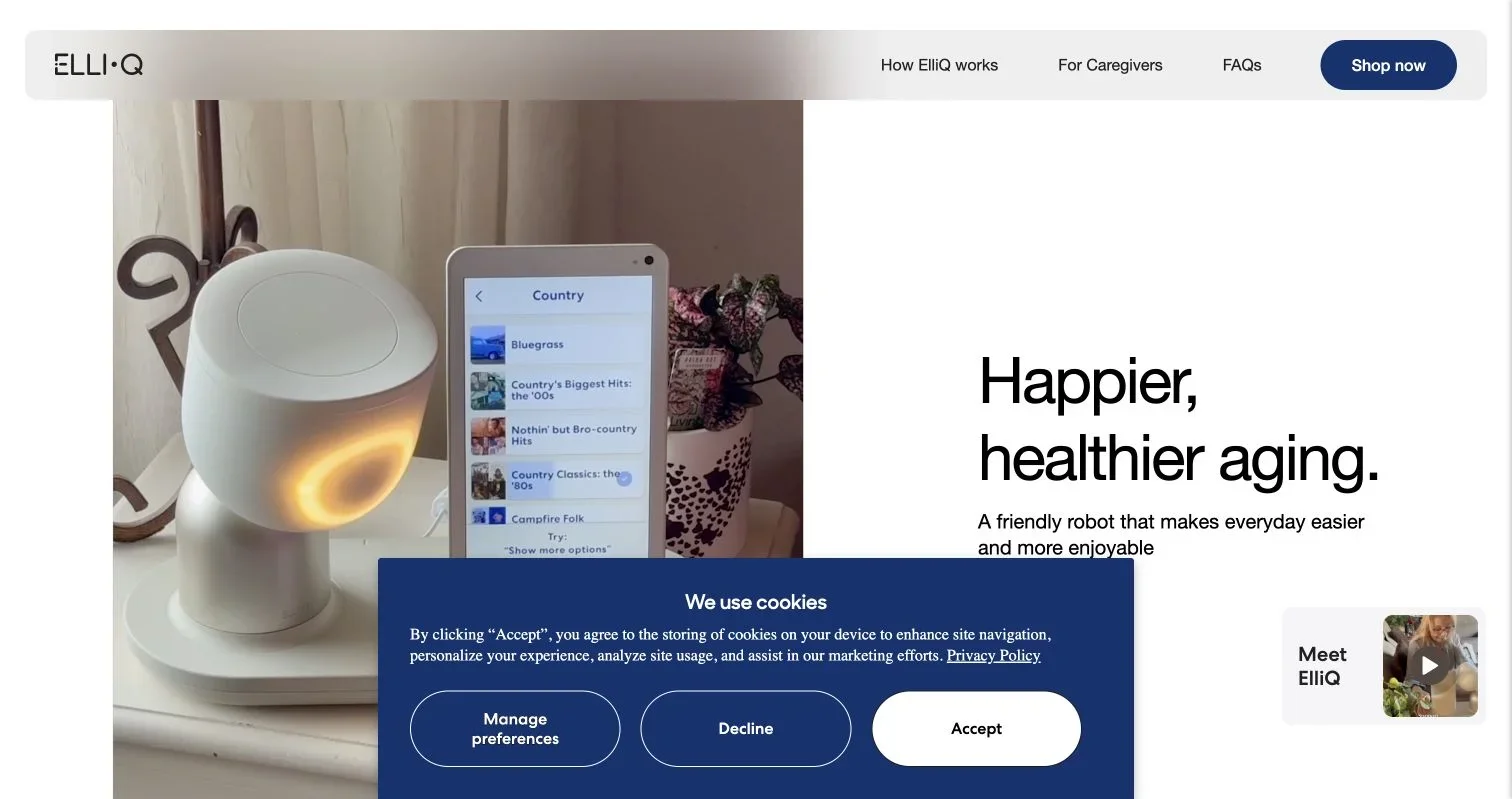
ElliQ is a useful commercial example, not a laboratory prototype. The manufacturer’s current product page describes conversation, medication reminders, health and pain tracking, games, messaging, and video calls. Its FAQ says the product is intended for one adult aged 60 or older, currently works in English in the United States, and requires power and Wi-Fi.

Source screenshot: ElliQ’s current commercial website. Product claims should be checked against the applicable membership terms and privacy policy before purchase.
The system appears to combine wake-word detection, speech recognition, cloud conversational AI, personalization, scheduled content, and presence sensing. Because ElliQ’s setup is proprietary, buyers should distrust undocumented claims about its language model or learning architecture. It is neither a vision-language-action mobile manipulator for chores nor a robot vacuum using SLAM to navigate a home.
Evidence for companion robots for older adults: promising, but not settled
Research supports cautious optimism. A recent systematic review of nine studies found statistically significant loneliness reductions in six studies involving AI-supported interventions, especially social robots. Three studies did not find significant effects, and the authors noted differences in intervention length, frequency, and study design.
A separate meta-analysis covering 19 studies reported an overall reduction in loneliness. That is encouraging but does not prove every conversational robot works for everyone.
Reasons to keep expectations measured include:
- Many studies have small samples or short follow-up periods.
- Products, settings, and outcome measures vary widely.
- A robotic pet in residential care is not equivalent to a generative-AI companion in a private home.
- Participants willing to join a robot study may be more receptive than the wider population.
- Company or program reports may lack an independent control group.
The New York State Office for the Aging says its ElliQ initiative has distributed about 900 units and reports high engagement and reductions in loneliness. Its program page also describes the work as an effort to test the technology’s efficacy. Those results merit attention but are not a universal medical outcome.
Artificial companionship can be real, but robots for seniors should widen a person’s social world, not become all of it.
Elder care technology for reminders, telepresence, and fall response
In current elder care technology, reminders and communication are often more dependable than free-form conversation, though workflow design still matters. A medication prompt is not medication management; a caregiver dashboard is not continuous clinical monitoring.
| Function | Sensible expectation | Safety boundary |
|---|---|---|
| Medication reminder | Announces a user-approved schedule | Does not verify the drug, dose, or ingestion |
| Video calling | Reduces friction when contacting known people | Requires connectivity and correct contact permissions |
| Activity status | Shows recent interaction with the device | Silence does not prove a fall or emergency |
| Self-report alert | Shares a pain or mood report with an approved contact | Depends on the user speaking and the system understanding |
| Fall detection integration | Relays an alert from a compatible wearable or sensor | Must not be assumed unless explicitly documented and tested |
| Emergency calling | Contacts a person or monitoring service when supported | A general companion may not reach emergency services |
ElliQ explicitly states in its FAQ that it is not an emergency device. It can contact someone for non-emergency support, but its guidance says to call 911 in emergencies.
For someone at meaningful fall risk, prioritize a personal emergency response system, smartwatch, or professionally monitored detector. The US National Institute on Aging recommends preparing for falls with a charged phone, regular human contact, or an emergency response system.
Test the response chain:
- Trigger a test alert from the location where a fall is most plausible.
- Confirm who receives it and how quickly.
- Check what happens if Wi-Fi, power, or the caregiver’s phone is unavailable.
- Verify that the older adult can cancel a false alarm.
- Repeat the test after app, router, or contact-list changes.
Accessibility in companion robots for older adults
Older adults vary enormously in hearing, vision, speech, dexterity, memory, language, and technological comfort. A cheerful voice interface may free one person and exhaust another.
| Item | What to Check | Why It Matters |
|---|---|---|
| Speech recognition | Test the user’s natural accent, pace, and volume | Demo-room accuracy may not survive real speech or television noise |
| Hearing access | Adjustable volume, captions, and visual alerts | Voice-only prompts can be missed |
| Vision access | Text size, contrast, glare, and screen placement | A large screen is useless if controls remain small |
| Motor access | Tactile buttons and forgiving touch targets | Tremor or arthritis can make precise taps difficult |
| Cognitive load | Few steps, consistent wording, easy recovery | Deep menus and changing commands create frustration |
| Language support | Supported languages and regional availability | Translation through general AI may be unreliable |
| Support | Human setup help, replacement process, and service hours | Family members often become unpaid technical support |
Test it in the home. Television noise, weak Wi-Fi, unfamiliar charging, and distant screens expose problems polished videos miss.
Privacy, consent, and the caregiver boundary
Home care robots may hear intimate conversations, learn routines, display family photos, store wellness entries, and reveal whether someone has recently interacted with them. That makes privacy a daily care issue, not a one-time terms exercise.
ElliQ says microphones listen for its wake word while idle, cameras are used for presence sensing, and full camera use occurs for selected features such as video calls. It also says sharing with caregivers is user-controlled. Buyers should verify these manufacturer claims against the current privacy policy and controls.
The US Federal Trade Commission advises voice-assistant owners to understand when recording begins, examine retention practices, delete old recordings where possible, use strong unique passwords, enable multi-factor authentication, and review connected accounts. Its voice-assistant privacy guidance notes that wake words can be misheard.
Before installation, agree on the following:
- What audio, video, activity, contact, and wellness data the system collects
- Whether processing happens locally or in the cloud
- How long recordings, transcripts, and summaries are retained
- Which relatives, caregivers, vendors, or service providers can see each data type
- Whether data is used for model training, product improvement, advertising, or research
- How the user can withdraw consent, delete data, remove a caregiver, or close the account
- What visitors should be told about microphones and cameras in the room
Consent must remain revocable without family pressure. If cognitive capacity fluctuates, involve appropriate care and legal professionals instead of treating app permission as permanent.
Caregiver access can turn good intentions into surveillance. A last-active timestamp may reassure, but repeated checks can erode autonomy. Grant only the access needed.
Safety limits for home care robots
Generative conversation makes newer home care robots more flexible but introduces errors, fabricated details, and misplaced confidence. A warm voice does not ensure accuracy.
Use explicit boundaries:
- Do not rely on the robot for diagnosis, medication changes, dosage advice, or interpretation of urgent symptoms.
- Keep emergency numbers and a non-robot backup communication method accessible.
- Prevent purchases, account changes, or door access without authentication.
- Position moving devices away from stairs, loose rugs, cables, pets, and walking routes.
- Review remotely added reminders with the older adult before activation.
- Treat sudden changes in robot-generated summaries as prompts to check in, not clinical conclusions.
- Confirm what functions stop when the subscription, cloud service, power, or internet connection ends.
Watch for emotional overreach. The system should identify itself as software, claim neither consciousness nor professional authority, and never pressure users to keep secrets from family or clinicians. Affection is not the problem; deception and dependency are.
Availability, pricing, and the real cost of robots for seniors
ElliQ is a clear commercial option. Its site says it ships in the United States, while the membership page currently lists these subscription choices:
| Plan | Advertised rate | Billing commitment |
|---|---|---|
| Monthly | $59 per month | Month to month |
| Annual | $49 per month | $588 billed for 12 months |
| 24-month | $39 per month | $936 billed for 24 months |
Buyers should check current prices, initiation fees, ownership or leasing conditions, trial eligibility, returns, warranties, and the device’s status after cancellation.
Other products occupy different niches:
- Robotic pets focus on tactile interaction and usually omit video calling or open conversation.
- Smart displays can provide reminders and calls at lower cost, but are not designed specifically around older-adult engagement.
- Mobile home robots add navigation and remote viewing, with more cost, mechanical risk, and setup complexity.
- Research humanoids impress in demonstrations but rarely have dependable household support.
The useful comparison is often home care robots versus simpler technology, not human caregivers. A tablet, smart speaker, emergency pendant, or calling service may solve the problem more cheaply with less data collection.
A practical buying checklist for elder care technology
A trial should answer operational questions before novelty becomes a long contract.
| Item | What to Check | Why It Matters |
|---|---|---|
| User choice | The older adult wants the device and can stop using it | A family’s anxiety is not sufficient consent |
| Primary job | One or two measurable goals are defined | Feature lists obscure whether the product solves the real problem |
| Emergency boundary | Emergency capabilities and backups are documented | Companion features can be mistaken for monitored protection |
| Home test | Voice, hearing, screen, Wi-Fi, and placement are tested | Accessibility depends on the environment |
| Privacy controls | Retention, deletion, caregiver access, and training use are understood | Sensitive household data can outlive the trial |
| Commercial status | Shipping region, support, updates, and return terms are confirmed | An announced robot is not a supported deployment |
| Total cost | Hardware, subscription, connectivity, installation, and cancellation are included | A low monthly headline can hide commitment costs |
| Human contact | Visits and calls remain part of the care plan | A robot should supplement relationships, not displace them |
The best AI companion robot for elderly users is not the most human-looking. It is one the older adult willingly uses, understands, silences, and can live without during an outage. That standard is less cinematic, and far safer.
Frequently Asked Questions
Can an AI companion robot replace a caregiver or emergency response system?
No. Companion robots can support conversation, reminders, and communication, but they generally cannot provide hands-on care, confirm medication use, or reliably respond to falls. People with significant safety risks should retain human support and dedicated emergency equipment.
How do I choose the right companion robot for an older adult?
Start by identifying one or two practical goals, such as easier video calls, daily reminders, or social engagement. Then test the device with the intended user in their home, paying close attention to accessibility, Wi-Fi reliability, privacy controls, and ease of recovery from mistakes.
Can a companion robot safely manage medication reminders?
It can announce a schedule approved by the user or caregiver, but a reminder does not verify the medication, dose, or whether it was taken. Medication management should remain under the supervision of the older adult, caregiver, pharmacist, or clinician, as appropriate.
What happens if the power, internet, or subscription stops?
Cloud-based conversation, calls, caregiver features, and reminders may become partly or completely unavailable. Before buying, confirm which functions work offline and keep a charged phone, written contacts, and other necessary backups accessible.
What privacy questions should families ask before installation?
Ask what audio, video, activity, and wellness data is collected, where it is processed, how long it is retained, and who can access it. Also verify how to delete data, revoke caregiver permissions, disable sensors, and close the account.
Are companion robots proven to reduce loneliness?
Research suggests that some social robots and AI-supported interventions can reduce loneliness, but results vary by product, user, setting, and study design. A robot is best treated as one part of a broader social plan that still includes regular contact with other people.
How can buyers tell whether the cost is worthwhile?
Compare the full cost, including hardware, subscriptions, connectivity, setup, and cancellation terms, with simpler options such as a tablet, smart speaker, emergency pendant, or calling service. A short trial with measurable goals can show whether the older adult actually uses and benefits from the device before making a long-term commitment.